Domain Enumeration
Tags:powershellActive-Directory Related to:hackingbug-bountyTCMcrtposcpenumeration See also: Introduction to Active Directory Enumeration Cheatsheet AD Access Control Model Index: 📋AD-Index-Work-Log
Summary
Introduction and techniques of Domain Enumeration
Todo
- Command cheat sheet
Domain Enumeration
Mapping of various entities, trusts, relationships and privilages for the target domain.
Tools used
-
MS AD Powershell module (Signed and works even in CLM) - prefered as it is MS tool
-
Bloodhound
-
Powerview(Powershell script)
-
SharpView(C#)
Run invisishell to disable powershell security features first.
Kerberos policy is important - gives information with regards to TGT - can help make tickets that avoid detection following the Kerberos policy
Never use NET commands for domain enum - uses SAMR Other tools use LDAP
Canary tokens and deception might be available in the environment - enumerate properly Look at user properties like logon count - try to avoid accounts with low login count check last login and bad password time Some accounts might store password in description, builtin accounts are mentioned in description - can also be a decoy
Group permissions - helps mapping attack path - multiple group membership of users is beneficial
Local admin rights required for enumerating actively logged on users, logged users, last loggged user on a computer
SHares on a machine, that current current user can access can be listed - shares are interesting because many users has access. Servers with fileserver role are interesting targets
Recusrive mebership?
Group policies - are abused a lot - hard for red teamers, blue teamers are well versed group policy is applied on OU
gpo powerful and prone to lot of misconfigs
restricted groups - attractive target
users, machines in specifc gp can be neumerated
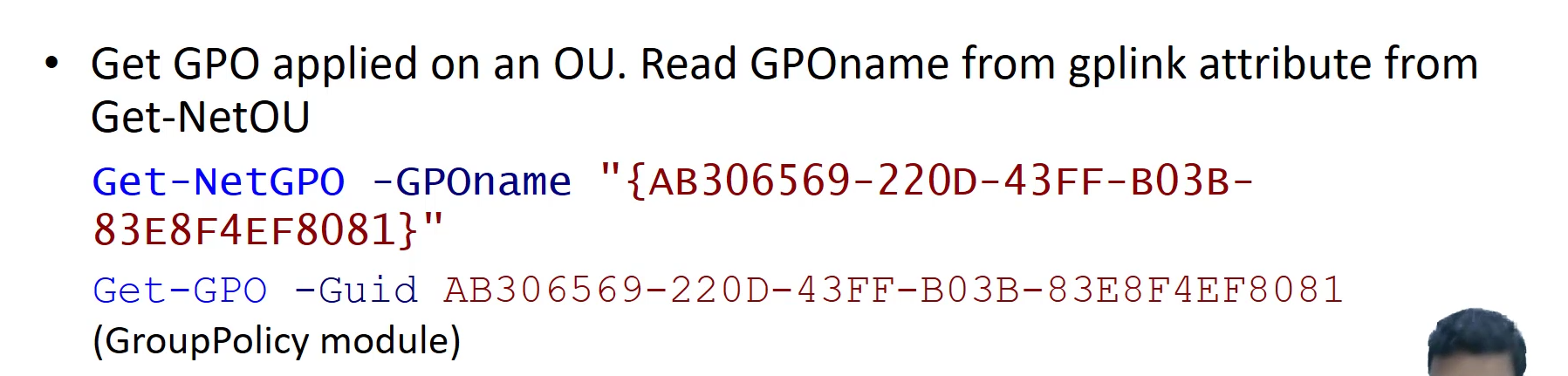
gplink - cn- name of group policy applied
distinuished name
list of users, list of computers get net users Get net computer - computers in the domain
shows computer objects - need not be an actual machine
can get all properties
we can try pinging it might not work if ping is disabled
Get domain groups get local groups
filtering for relevant strings
members list
domain admins, enterprise admins are good group for attackers to target
a group can be part of a group
can use recursive option
we can see which groups are a user part of as well
net logged on - locally logged on users on x computer - requires remote registry and admin rights
find shares
Learning Objective 1
Info form group policy
admin make changes to group of objects (users computers etc) using group policy
get list of all group policy on the domain
which gpo is set for a particular machine
restricted groups - attractive target
Learning objective 2
Check privileges of current user in Powershell
whoami /priv

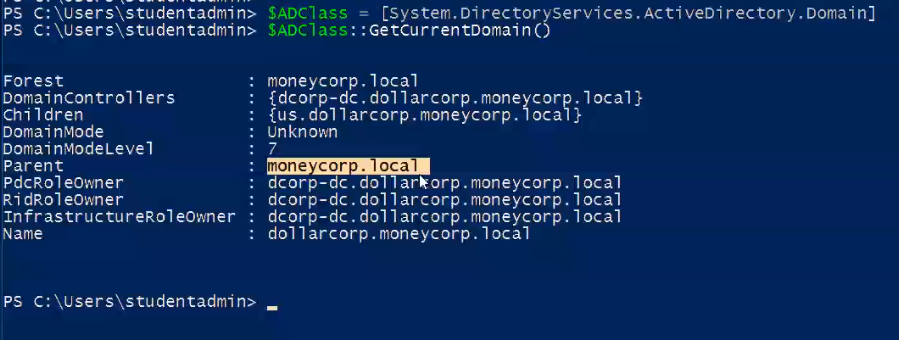
How to enumerate domain? (Method 1 - .NET Classes)
$ADClass = [System.DirectoryServices.ActiveDirectory.Domain]
$ADClass::GetCurrentDomain()
How to enumerate domain? (Using Powerview)
How to enumerate domain? (Using Microsoft AD Module)
Advantages of AD Module over Powerview
- Less chance of Antivirus detection
- Works well in constrained-language mode
Tips
- Install tools in a folder in C drive (for eg:
C:\AD\Tools) to prevent Anti Virus detection. - Microsoft AD Module is preferable over Powerview as AD module is a tool by Microsoft and is less likely to be detected by Anti Virus.